8 FILE & STREAM
Introduction
A file is a container in computer storage devices used for storing data.
Why files are needed?
- Storing in a file will preserve our data even if the program terminates.
- Easily moving our data from one computer to another without any changes.
Types of Files
There are two types of files:
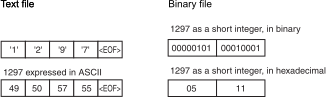
- Text files: containing data that has been encoded as text, using a scheme such as ASCII or Unicode.
- Binary files: containing data in the binary form (0’s and 1’s).
8.1 Endianness, Alignment & Padding
Endianness
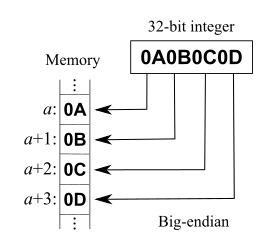
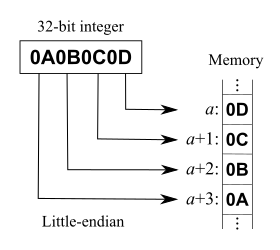
Endianness is the order or sequence of bytes of a word of digital data in computer memory.
- A big-endian system stores the most significant byte of a word at the smallest memory address and the least significant byte at the largest.
- A little-endian system, in contrast, stores the least-significant byte at the smallest address.
Data Alignment
Data alignment means putting the data in memory at an address equal to some multiple of the word size. This increases the performance of the system due to the way the CPU handles memory.
- A
char(one byte) will be 1-byte aligned. - A
short(two bytes) will be 2-byte aligned. - An
int(four bytes) will be 4-byte aligned. - A
long(four bytes) will be 4-byte aligned. - A
float(four bytes) will be 4-byte aligned.
Data structure padding
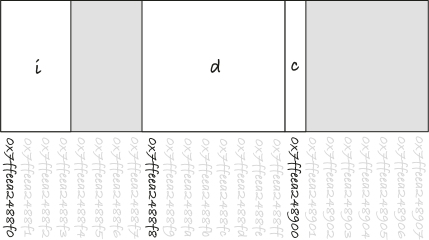
Data structure padding means to insert some extra bytes between the end of the last data structure and the start of the next data structure.
struct Type {
    int i;
    double d;
    char c;
};
Type data[2]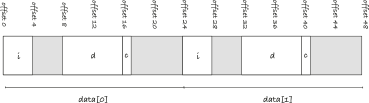
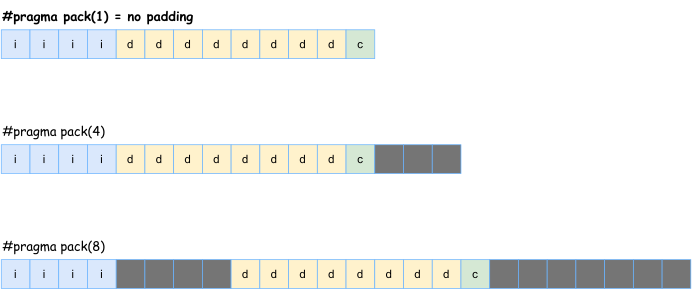
#pragma pack
Specifies the packing alignment for structure, union, and class members.
#pragma pack( push, n )#pragma pack( pop, n )#pragma pack( n )
The default value for n is 8
Bit Fields
Classes and structures can contain members that occupy less storage than an integral type. These members are specified as bit fields.
struct Date {
   unsigned short nWeekDay  : 3;    // 0..7   (3 bits)
   unsigned short nMonthDay : 6;    // 0..31  (6 bits)
   unsigned short nMonth    : 5;    // 0..12  (5 bits)
   unsigned short nYear     : 8;    // 0..100 (8 bits)
};
Fixed-width integers
- Since C++11, C++ officially adopted these fixed-width integers (defined in
<cstdint>)
| Name | Type | Size |
|---|---|---|
std::int8_t |
signed | 8 bit |
std::uint8_t |
unsigned | 8 bit |
std::int16_t |
signed | 16 bit |
std::uint16_t |
unsigned | 16 bit |
std::int32_t |
signed | 32 bit |
std::uint32_t |
unsigned | 32 bit |
std::int64_t |
signed | 64 bit |
std::uint64_t |
unsigned | 64 bit |
8.2 File in C
File Operations
In C/C++, we use the library stdio.h or cstdio to perform four major operations on files, either text or binary:
- Creating a new file
- Opening an existing file
- Closing a file
- Reading from and writing information to a file
Opening or Creating a File
FILE * fopen(const char * filename, const char * mode)
| Mode | Meaning |
|---|---|
r |
open a file in read mode |
w |
open or create a file in write mode |
a |
open a file in append mode |
r+ |
open a file in both read and write mode |
a+ |
open a file in both read and write mode |
w+ |
open a file in both read and write mode |
b |
binary mode (default text mode) |
- Return value: This function returns a FILE pointer. Otherwise, NULL is returned
Closing a File
fclose(FILE *fptr);
#include <stdio.h>
int main () {
    FILE * fptr;
    fptr = fopen("data.txt","r");
    if (fptr!=NULL) {
        // ...
        fclose(fptr);
    }
    return 0;
}
Reading and writing to a text file
fprintf(...)andfscanf(...)
FILE *fptr;

// Open a file in writing mode
fptr = fopen("data.txt", "w");

// Write some text to the file
fprintf(fptr, "Some text");

// Close the file
fclose(fptr);
Reading and writing to a binary file
fwrite(...)andfread(...)
FILE *fptr;
int a[3] = {1, 4, 5};

// Open a file in writing mode
fptr = fopen("data.bin", "wb");

// Write an array to the file
fwrite(a, sizeof(a), fptr);

// Close the file
fclose(fptr);
8.3 File & Stream in C++
File & Stream
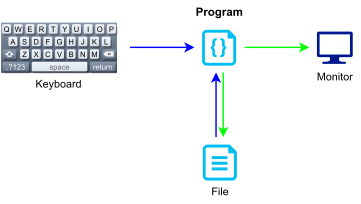
A stream is simply a flow of data. C++ streams are a generic implementation of read and write (in other words, input and output) logic that enables you to use certain consistent patterns toward reading or writing data.
Stream Hierachy
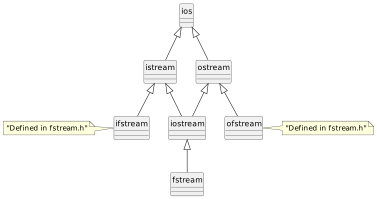
File Stream Data Types
| Data Type | Description |
|---|---|
ifstream |
Input File Stream. This data type can be used only to read data from files into memory. |
ofstream |
Output File Stream. This data type can be used to create files and write data to them. |
fstream |
File Stream. This data type can be used to create files, write data to them, and read data from them. |
Using the fstream Data Type
fstream dataFile;
dataFile.open(filename, flags);| File Access Flag | Meaning |
|---|---|
ios::app |
Append mode. If the file already exists, its contents are preserved and all output is written to the end of the file. By default, this flag causes the file to be created if it does not exist. |
ios::ate |
If the file already exists, the program goes directly to the end of it. Output may be written anywhere in the file. |
ios::binary |
Binary mode. When a file is opened in binary mode, data are written to or read from it in pure binary format. (The default mode is text.) |
ios::in |
Input mode. Data will be read from the file. If the file does not exist, it will not be created, and the open function will fail. |
ios::out |
Output mode. Data will be written to the file. By default, the file’s contents will be deleted if it already exists. |
ios::trunc |
If the file already exists, its contents will be deleted (truncated). This is the default mode used by ios::out. |
Opening and Closing a File
fstream dataFile;
dataFile.open("data.txt", ios::in|ios::out|ios::trunc);

if (dataFile.is_open()) {
    // do reading or writing here

    dataFile.close();
}
Text Files
Writing to a File
#include <iostream>
#include <fstream>
using namespace std;
int main() {
    fstream dataFile;
    cout << "Opening file...\n";
    dataFile.open("demofile.txt", ios::out);    // Open for output
    cout << "Now writing data to the file.\n";
    dataFile << "Jones\n";                      // Write line 1
    dataFile << "Smith\n";                      // Write line 2
    dataFile << "Willis\n";                     // Write line 3
    dataFile << "Davis\n";                      // Write line 4
    dataFile.close();                           // Close the file
    cout << "Done.\n";
    return 0;
}
Program Output
Opening file...
Now writing data to the file.
Done.
Output to File demofile.txt
Jones
Smith
Willis
Davis
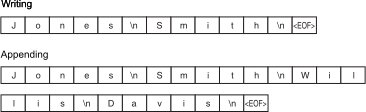
Appending to a File
#include <iostream>
#include <fstream>
using namespace std;
int main() {
    ofstream dataFile;
    cout << "Opening file...\n";
    // Open the file in output mode.
    dataFile.open("demofile.txt", ios::out);
    cout << "Now writing data to the file.\n";
    dataFile << "Jones\n";                     // Write line 1
    dataFile << "Smith\n";                     // Write line 2
    cout << "Now closing the file.\n";
    dataFile.close();                          // Close the file
    cout << "Opening the file again...\n";
    // Open the file in append mode.
    dataFile.open("demofile.txt", ios::out | ios::app);
    cout << "Writing more data to the file.\n";
    dataFile << "Willis\n";                    // Write line 3
    dataFile << "Davis\n";                     // Write line 4
    cout << "Now closing the file.\n";
    dataFile.close();                          // Close the file
    cout << "Done.\n";
    return 0;
}
File Output Formatting
#include <iostream>
#include <iomanip>
#include <fstream>
using namespace std;
int main() {
    fstream dataFile;
    double num = 17.816392;
    dataFile.open("numfile.txt", ios::out);    // Open in output mode
    dataFile << fixed;            // Format for fixed-point notation
    dataFile << num << endl;      // Write the number
    dataFile << setprecision(4);  // Format for 4 decimal places
    dataFile << num << endl;      // Write the number
    dataFile << setprecision(3);  // Format for 3 decimal places
    dataFile << num << endl;      // Write the number
    dataFile << setprecision(2);  // Format for 2 decimal places
    dataFile << num << endl;      // Write the number
    dataFile << setprecision(1);  // Format for 1 decimal place
    dataFile << num << endl;      // Write the number
    cout << "Done.\n";
    dataFile.close();             // Close the file
    return 0;
}
Contents of File numfile.txt
 17.816392
 17.8164
 17.816
 17.82
 17.8
The End-of-Line Puzzle
End of line
- UNIX uses
<LINE FEED>for end-of-line. - Windows uses the two characters:
<RETURN><LINE FEED>for end-of-line - Apple uses
<RETURN>
End of file
- Old operating systems use
<EOF>(a charater) for end-of-file. - Most modern operating systems use
<EOF>(a condition) for end-of-file.
Reading from a File
Consider the file
murphy.txt, which contains the following data:Jayne Murphy 47 Jones Circle Almond, NC 28702
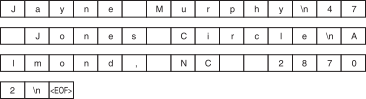
getline(dataFile, str, '\n');The three arguments in this statement are explained as follows:
dataFileThis is the name of the file stream object. It specifies the stream object from which the data is to be read. strThis is the name of a stringobject. The data read from the file will be stored here.\nThis is a delimiter character of your choice. If this delimiter is encountered, it will cause the function to stop reading. (This argument is optional. If it’s left out, ’\n’is the default.)
#include <iostream>
#include <fstream>
#include <string>
using namespace std;
int main() {
    string input;      // To hold file input
    fstream nameFile;  // File stream object
    nameFile.open("murphy.txt", ios::in);
    if (nameFile) {
        getline(nameFile, input);
        while (nameFile) {
            cout << input << endl;
            getline(nameFile, input);
        }
        nameFile.close();
    }
    else
        cout << "ERROR: Cannot open file.\n";
    return 0;
}
Error Testing
Stream Bits
| Bit | Description |
|---|---|
ios::eofbit |
Set when the end of an input stream is encountered. |
ios::failbit |
Set when an attempted operation has failed. |
ios::hardfail |
Set when an unrecoverable error has occurred. |
ios::badbit |
Set when an invalid operation has been attempted. |
ios::goodbit |
Set when all the flags above are not set. Indicates the stream is in good condition. |
Functions to Test the State of Stream Bits
| Function | Description |
|---|---|
eof() |
Returns true (nonzero) if the eofbit flag is set, otherwise returns false. |
fail() |
Returns true (nonzero) if the failbit or hardfail flags are set, otherwise returns false. |
bad() |
Returns true (nonzero) if the badbit flag is set, otherwise returns false. |
good() |
Returns true (nonzero) if the goodbit flag is set, otherwise returns false. |
clear() |
When called with no arguments, clears all the flags listed above. Can also be called with a specific flag as an argument. |
Example
- The function
showState
void showState(fstream &file) {
   cout << "File Status:\n";
   cout << " eof bit: " << file.eof() << endl;
   cout << " fail bit: " << file.fail() << endl;
   cout << " bad bit: " << file.bad() << endl;
   cout << " good bit: " << file.good() << endl;
   file.clear();     // Clear any bad bits
}
Binary Files
Text Files vs. Binary Files
The Write and Read Member Functions
The general format of the
writemember function isfileObject.write(address, size);fileObjectis the name of a file stream object.addressis the starting address of the section of memory that is to be written to the file. This argument is expected to be the address of achar(or a pointer to achar).sizeis the number of bytes of memory to write. This argument must be an integer value.
The general format of the
readmember function isfileObject.read(address, size);fileObjectis the name of a file stream object.addressis the starting address of the section of memory where the data being read from the file is to be stored. This is expected to be the address of achar(or a pointer to achar).sizeis the number of bytes of memory to read from the file. This argument must be an integer value.
Example
#include <iostream>
#include <fstream>
using namespace std;
int main() {
    const int SIZE = 10;
    fstream file;
    int numbersOut[SIZE] = {1, 2, 3, 4, 5, 6, 7, 8, 9, 10};
    int numbersIn[SIZE];
    file.open("numbers.dat", ios::out | ios::binary);
    cout << "Writing the data to the file.\n";
    file.write((char *)numbersOut, sizeof(numbersOut));
    file.close();
    file.open("numbers.dat", ios::in | ios::binary);
    cout << "Now reading the data back into memory.\n";
    file.read((char *)numbersIn, sizeof(numbersIn));
    for (int count = 0; count < SIZE; count++)
        cout << numbersIn[count] << " ";
    cout << endl;
    file.close();
    return 0;
}
File format
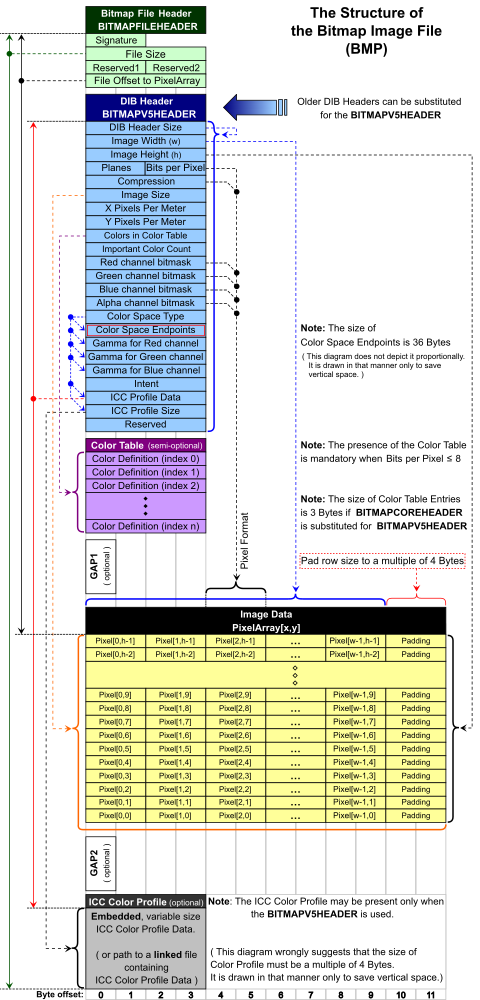
A file format is a standard way that information is encoded for storage in a computer file.
Creating Records with Structures
const int NAME_SIZE = 51, ADDR_SIZE = 51, PHONE_SIZE = 14;

struct Info {
    char name[NAME_SIZE];
    int age;
    char address1[ADDR_SIZE];
    char address2[ADDR_SIZE];
    char phone[PHONE_SIZE];
};
Store a Record to a File
int main() {
    Info person;  // To hold info about a person
    char again;   // To hold Y or N
    fstream people("people.dat", ios::out | ios::binary);
    do {
        cout << "Enter the following data about a "
             << "person:\n";
        cout << "Name: ";
        cin.getline(person.name, NAME_SIZE);
        cout << "Age: ";
        cin >> person.age;
        cin.ignore(); // Skip over the remaining newline.
        cout << "Address line 1: ";
        cin.getline(person.address1, ADDR_SIZE);
        cout << "Address line 2: ";
        cin.getline(person.address2, ADDR_SIZE);
        cout << "Phone: ";
        cin.getline(person.phone, PHONE_SIZE);
        people.write((char *)&person, sizeof(person));
        cout << "Do you want to enter another record? ";
        cin >> again;
        cin.ignore(); // Skip over the remaining newline.
    } while (again == 'Y' || again == 'y');
    people.close();
    return 0;
}
Read a Record from a File
int main() {
    Info person;     // To hold info about a person
    char again;      // To hold Y or N
    fstream people;  // File stream object
    people.open("people.dat", ios::in | ios::binary);
    if (!people) {
        cout << "Error opening file. Program aborting.\n";
        return 0;
    }
    cout << "Here are the people in the file:\n\n";
    people.read((char *)&person, sizeof(person));
    while (!people.eof()) {
        // Display the record.
        cout << "Name: ";
        cout << person.name << endl;
        cout << "Age: ";
        cout << person.age << endl;
        cout << "Address line 1: ";
        cout << person.address1 << endl;
        cout << "Address line 2: ";
        cout << person.address2 << endl;
        cout << "Phone: ";
        cout << person.phone << endl;
        cout << "\nPress the Enter key to see the next record.\n";
        cin.get(again);
        people.read((char *)&person, sizeof(person));
    }
    cout << "That's all the data in the file!\n";
    people.close();
    return 0;
}
Design Structure for Format
| Name | Size [Bytes] | Description | |
|---|---|---|---|
| name | 51 | C string | |
| N\,\times | age | 4 | integer |
| address1 | 51 | C string | |
| address2 | 51 | C string |
Random-Access Files
Random-Access
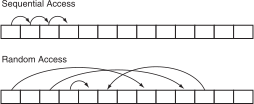
Random access means nonsequentially accessing data in a file.
Read/Write Position
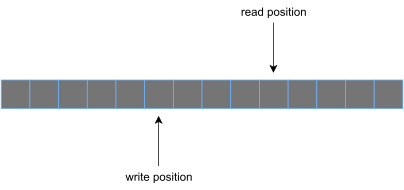
File stream object has the read/write position in the file.
The seekp and seekg Member Functions
The
seekpfunction is used with files opened for output to change the write position.file.seekp(offset, mode);The
seekgfunction is used with files opened for input to change the read position.file.seekg(offset, mode);
| Mode Flag | Description |
|---|---|
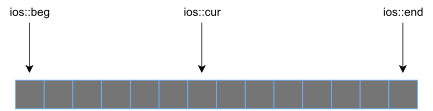
ios::beg |
The offset is calculated from the beginning of the file. |
ios::end |
The offset is calculated from the end of the file. |
ios::cur |
The offset is calculated from the current position. |
- Warning: If a program has read to the end of a file, we must call the file stream object’s
clearmember function before callingseekgorseekp. This clears the file stream object’seofflag. Otherwise, theseekgorseekpfunction will not work.
The tellp and tellg Member Functions
tellpreturns the write positiontellgreturns the read position
pos = outFile.tellp();
pos = inFile.tellg();
8.4 Workshop
Quiz
- What is data alignment?
Exercises
- Write a program that reads a file and then counts the number of lines in it.